
Privacy Officer Check-Up 10 Things You Should Review

Privacy Officer Check-Up 10 Things You Should Review

Privacy Officer Check-Up: 10 Things You Should Review

When was the last time you checked whether your privacy management program still reflects how your healthcare practice actually operates?

Employees change. Technology changes. Vendors change. New AI tools appear. Meanwhile, policies, procedures and Privacy Impact Assessments can quickly become outdated.

A Privacy Officer Check-Up helps you recognize what you have accomplished, identify what has changed and prioritize what needs attention next.

You do not need to fix everything today. The goal is to know where you are—and what comes next.

1. Confirm Your Privacy Officer Information Is Current

Check that the correct Privacy Officer information appears in your policies, collection notices, patient information, website, Privacy Impact Assessments and information provided to your privacy regulator, where applicable.

Identify the Privacy Officer including a telephone number or email address patients can use.

Most importantly, make sure everyone on your team knows who the Privacy Officer is and how to contact them.

2. Review Privacy Awareness Training

Privacy training should be included in onboarding, regular annual refresher training and updates following changes to legislation, technology, policies or privacy risks.

Registering someone for training is not the same as confirming they completed it. Your records should demonstrate who completed the training and when.

3. Review Oaths of Confidentiality Agreements

Confirm that custodians and affiliates—including employees, contractors, students and volunteers—have signed current and appropriate Oaths of Confidentiality.

Check that the agreements are signed, current, appropriate to each person’s responsibilities and accessible in the applicable personnel or contractor record.

4. Review User Accounts and Access Permissions

Ask your system administrators or IT provider to generate current user-account reports for your:

  • EMR, pharmacy management or clinical systems
  • Email and business computer systems
  • Microsoft 365 or Google Workspace
  • Shared folders and cloud applications
  • Remote-access tools
  • Administrative accounts

Remove or disable accounts that are no longer required. Confirm that current users have access appropriate to their roles. Document that the review was completed.

5. Check Whether Your PIAs Are Current

Compare your current operations with your existing Privacy Impact Assessments.

Have you changed software, vendors, locations, patient communication tools, information flows, business structure or Privacy Officer? Have you changed how health information is collected, used, disclosed, stored or destroyed?

Determine whether a PIA amendment, update or new PIA may be required.

6. Identify New Software, Vendors and Technology

Make a list of technology introduced since your last privacy review. This might include online booking, patient portals, electronic forms, payment systems, cloud storage, messaging tools, virtual care, transcription services or AI.

Privacy Officers should know which technologies handle health information and what safeguards are in place.

Review your Information Management Agreement listing and confirm that you have appropriate agreements with your service providers.

7. Find Out How Staff Are Using AI

Do not assume you know how AI is being used in your practice. Ask.

Staff and healthcare providers may be using AI for clinical documentation, meeting notes, drafting emails, summarizing documents, patient education, administration or marketing.

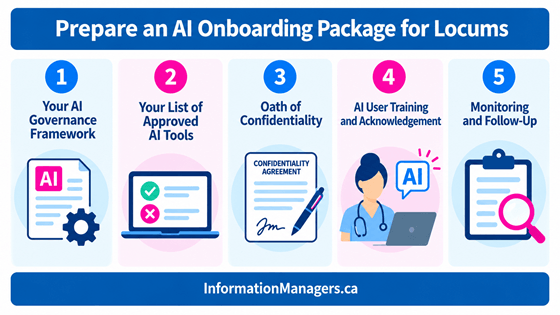
Confirm that identifying health information is not being entered into unapproved AI tools. Review whether your organization needs an AI Governance Framework, approved-tool list, vendor assessment, training or PIA.

8. Review Your Privacy Breach and Incident Log

Review the privacy incidents, near misses, complaints and concerns recorded by your organization.

Look for recurring problems, incomplete corrective actions, additional training needs and outstanding notifications.

For example, if faxes continue to be sent to the wrong recipients, reminding employees to “be more careful” may not be an effective corrective action. A recurring problem may indicate that the process or technology needs to change.

If you do not have a privacy breach log, now is a good time to start one.

9. Review and Test Your Privacy Breach Response

Review the Privacy Breach Management procedure in your Health Information Privacy and Security Policies and Procedures Manual.

Confirm that staff know how to recognize a possible breach, who to notify, what immediate containment steps to take and what information to document.

Test the procedure using a short, realistic scenario. A five-minute tabletop exercise can help your team understand what to do before a real incident occurs.

Document the exercise, who participated and any follow-up actions identified.

10. Document Your Review and Follow-Up Actions

For each checklist item:

  • Record what you reviewed
  • Identify any gaps
  • Assign responsibility
  • Establish a realistic follow-up date
  • Document when the action is completed

Keep the completed checklist as evidence of your ongoing privacy management program and demonstrable accountability.

Practical Privacy Tip

Do not try to fix everything during the check-up.

First, identify what is working, what has changed and what needs attention. Then prioritize your actions, assign responsibility and set realistic follow-up dates.

One completed action followed by another is more effective than an overwhelming list that never gets started.

Download the Privacy Officer Check-Up

Would you like a practical way to complete this review?

Download the Privacy Officer Check-Up: 10 Things You Should Review checklist.

Use it to recognize your accomplishments, identify gaps, assign responsibility and plan your next privacy management activities.

Get the checklist here:

Wish You Had a “Jeanie” to Help With Your Privacy Officer Role?

You don’t have to figure everything out on your own.

Practical Privacy Officer Strategies gives you practical training, tools, templates, and live coaching to help you know what to do next—and how to get it done.

Learn More About Practical Privacy Officer Strategies

How to Manage a Privacy Breach in Your Canadian Practice

How to Manage a Privacy Breach in Your Canadian Practice

​

How to Manage a Privacy Breach in Your Canadian Practice Workshop

Have you ever heard about a privacy breach at another practice and thought…

“I hope that never happens to us.”

The reality is — privacy breaches can happen in any healthcare practice, regardless of size, specialty, or technology. Whether it’s a misdirected fax, unauthorized access to a chart, lost device, or cyber incident, breaches are not a matter of if — but when.

What makes the difference is how prepared you are to respond.

I’m tickled pink to  partner with Kayla Das to deliver a live virtual workshop designed to provide practical, step-by-step guidance for Canadian healthcare practices. Kayla Das B.Rec, BSW, MSW, RSW is a trusted Business Coach For Therapists and Counsellors.

Live Virtual Workshop

How to Manage a Privacy Breach in Your Canadian Practice

In this interactive on-line session, we’ll walk you through what to do when a privacy breach occurs — before you ever have to face one in real time.

This workshop is ideal for:

  • Canadian clinic managers
  • Privacy officers
  • Practice owners
  • Social workers, counsellors, and mental health leaders
  • Clinical supervisors and consultants

If you are responsible for protecting patient information, this training will help you strengthen your breach response readiness.

What We’ll Cover

Participants will learn:

  • The difference — and overlap — between confidentiality and privacy
  • Legislative, regulatory, and professional practice requirements across Canada
  • Why privacy breaches are a significant risk you should prepare for
  • How to recognize when a breach has occurred
  • The 4-Step Response Plan for managing a privacy breach
  • Practical steps to prevent breaches before they happen
    … and more


Important for Ontario Practitioners

Ontario health information custodians (practice owners) are required to submit annual privacy breach statistics to the Ontario  Information and Privacy Commissioner by March 1 each year.

If you’re unsure what must be reported — or how to prepare — this workshop will address those requirements.

 Workshop Details

This on-demand mini-course, How to Manage a Privacy Breach in Your Canadian Practice is available now!
Mini-course is a replay from a live event hosted by Jean Eaton and Kayla Das on February 24, 2026 that is approximately 85 minutes.

Privacy breaches are stressful — but managing them doesn’t have to be overwhelming when you have a plan.

We hope you’ll join us for this practical, supportive session designed to help you protect your patients, your practice, and your professional reputation.

Texting with Patients: How to Do It Safely and Effectively

Texting with Patients: How to Do It Safely and Effectively

​Texting with Patients: How to Do It Safely and Effectively

Have you ever said…
“If only I had someone to ask!”

Each month, we tackle real questions from clinic managers, healthcare providers, and privacy officers inside Practice Management Success.

This month’s question:

Can you text your patients?

The short answer is:
Yes.

The better answer is:
Yes—but only if you do it thoughtfully, with the right safeguards in place.

Why This Matters

Texting is no longer “new.”

Patients expect it.
Staff rely on it.
And many EMRs now offer built-in messaging tools.

But here’s the problem:

👉 Texting is not always a secure communication method.

It’s difficult to:

  • Confirm who is sending or receiving the message
  • Control where the message is stored
  • Prevent miscommunication or disclosure

That means one quick message can turn into a privacy breach or medical error.

Start With Purpose (Not Technology)

Before you implement texting, ask:

Why do we want to use it?

Common reasons include:

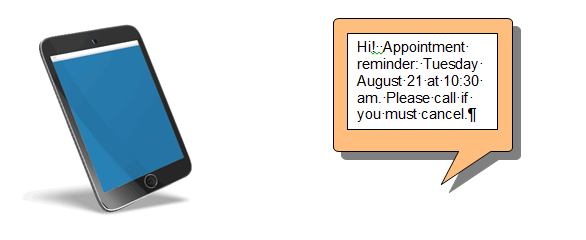
  • Appointment reminders
  • Scheduling changes
  • Improving patient access
  • Reducing phone volume

These are all valid—but they are not all equal in risk.

From the Patient to the Clinic

Some clinics allow patients to text:

  • Appointment requests
  • Questions about care
  • Follow-ups

In some cases—especially remote or higher-risk populations—this may improve access to care.

But you must weigh this carefully.

👉 Sometimes the risk of not communicating is greater than the risk of using an unsecured method.

This is where your professional judgment—and policies—matter most.

What Are the Risks?

As the custodian, you assume the risk of using unsecured communication.

So your job is to:

  • Define acceptable use
  • Set clear boundaries
  • Train your team
  • Communicate expectations to patients

One of the most practical ways to do this?

👉 Create scenarios

  • When is texting appropriate?
  • When is it not?
  • What should staff do instead?

Document these decisions as part of your implementation plan.

Workflow Matters More Than You Think

If a patient texts your clinic—what happens next?

You need clear answers to:

  • Who receives the message?
  • On what device?
  • How is it verified?
  • How is it documented in the patient record?

If it’s not documented, it didn’t happen.

From the Clinic to the Patient

This is where most clinics start—and where risk is easier to manage.

Best use cases:

  • Appointment reminders
  • Basic instructions
  • Non-sensitive communication

Higher-risk uses:

  • Test results
  • Clinical advice
  • Sensitive health information

👉 Keep texting administrative, not clinical, unless you have a secure solution.

Consent and Patient Understanding

Patients must understand:

  • How texting works in your clinic
  • The risks to their privacy
  • Their role in protecting their information

This includes:

  • Using a personal phone (not shared or work devices)
  • Keeping their phone secure
  • Updating their contact information

Consent is not just a form—it’s a conversation and an agreement.

Use the Right Technology

Whenever possible:

  • Use EMR-integrated messaging
  • Avoid personal devices
  • Implement role-based access
  • Enable audit logs
  • Use multi-factor authentication (MFA)

These tools help you:

  • Maintain control of patient information
  • Improve workflow
  • Reduce manual documentation

Don’t Skip the PIA

Before you implement texting or email communication:

👉 Complete or update your Privacy Impact Assessment (PIA)

This doesn’t have to be overwhelming—but it is essential.

Your PIA should describe:

  • What you are implementing
  • How information flows
  • Risks and mitigation strategies
  • Policies and procedures

Practical Take-Aways

If you’re thinking about texting patients:

  • Start with low-risk uses (appointment reminders)
  • Use approved systems—not personal phones
  • Define clear rules and workflows
  • Train your team using real scenarios
  • Document everything
  • Review and adjust regularly

Want Help Getting Started?

If you want to go deeper, I’ve created tools to help you implement this safely:

✔ Sample texting authorization forms
✔ Step-by-step procedures
✔ Training resources for your team
✔ PIA guidance and templates

👉 Download the FREE report:
Can You Use Text Messaging with Patients?

👉 Get ongoing support:
Practice Management Success Membership

👉 Join me live:
Q&A with Jean –  2nd Tuesday of each month at 12 noon MT

Final Thought

Texting can absolutely improve access, efficiency, and patient satisfaction.

But it must be done with intention.

Because when it comes to privacy:

When we know better—we can do better.

Jean L. Eaton is constructively obsessive about privacy, confidentiality, and security especially when it comes to the handling of personal health information. If you would like to discuss how I can help your practice, just send me an email. I am here to help you.

Jean L. Eaton
Your Practical Privacy Coach
INFORMATION MANAGERS

Data Privacy Day 2026 Resources For You!

Data Privacy Day 2026 Resources For You!

Data Privacy Day 2026 Resources for You!

Data Privacy Day is an internationally recognized day dedicated to creating awareness about the importance of privacy and protecting personal information.

That means a lot to me and I think it means a lot to you, too. I think it is important that we give our patients and clients the gift of privacy. And that we have the right tools and resources for our employees to make good privacy and security decisions in our businesses.

Information Managers Ltd. is a Data Privacy Champion!

Data Privacy Week Champion badge 2024

As a DPD Champion, Information Managers recognizes and supports the principle that organizations, businesses, and government all share the responsibility to be conscientious stewards of data by respecting privacy, safeguarding data, and enabling trust.

Each of us is responsible to manage our name and our identity. When you share your personal information, you have the right and responsibility to ask the person or business why they need the information and how they will protect your personal information.
Jean L. Eaton

Your Practical Privacy Coach, Information Managers Ltd.

Data Privacy Day Resources

5 Steps To Prevent Employee Snooping

SAY NO TO SNOOPING!

If an individual affiliate knowingly breaches the privacy and security of health information, and the custodian can demonstrate that reasonable safeguards (including privacy awareness training) were in place, the individual affiliate can be charged under the Health Information Act. Fines of up to $50,000 may be applied to the individual, in addition to other sanctions from their employers and/or their professional regulatory colleges where applicable (HIA s.107).

What Is Snooping?

Looking at someone’s personal information without having an authorized purpose to access that information to do your job is known as ‘snooping’.

Even when you are “just looking” at personal information but don’t share that information with anyone else, this is still a privacy breach.

It is illegal.

Snooping incidents are on the rise and can cost you time, money, heartache, and headache in your practice.

When there is an offence under the privacy legislation like the Health Information Act, there may be an investigation, charges and court appearances, fines, penalties, and loss of employment.

Snooping is entirely preventable.

How Can You Prevent Employee Snooping?

Let’s take a look at the pro-active steps that you can take today to prevent employee snooping.

Download the Practice Management Success Tip 5 Steps to Prevent Employee Snooping

The Practice Management Success Tip, 5 Steps to Prevent Employee Snooping, will help you

  • Take 5 practical steps to prevent employee snooping.
  • Provide clarity about what is considered a privacy breach.
  • Contribute to the health information privacy compliance in your healthcare practice.

Get 5 Steps to Prevent Employee Snooping HERE!

Protect Your Organization and Your Patients With a Privacy Awareness Quiz

Equip your staff with the information they need to confidently and correctly handle personal health information.

Healthcare businesses need privacy awareness training to support key policies and procedures, and risk management programs need a privacy awareness training program.

Reasonable Safeguards

As an employer and healthcare provider, you are responsible to provide training to all of your employees about privacy awareness.

If you don’t provide the training, or if the employees don’t understand the policies and there is a privacy breach, then the healthcare provider is more likely to be held accountable under the legislation and face penalties, including fines and even prison!

Patients value the privacy and security of their information.

Healthcare providers and clinic managers value privacy and security, and they value not having adverse results as a lack of compliance or patient safety issues.

If patients don’t feel that the healthcare provider will keep their information confidential and secure, patients may choose not to share their information, which may impact their healthcare and treatment.

When we are privacy aware, we can better respond to patients’ questions and build their trust in the quality of services that we provide.

Download the Privacy Awareness Quiz to use today to train your employees and protect your patients’ health information.

Privacy Breach Nugget: When Patient “Success Stories” Become a Privacy Breach

Privacy Breach Nugget: When Patient “Success Stories” Become a Privacy Breach

​When Patient “Success Stories” Become a Privacy Breach

Privacy Breach Nugget

Ever wonder how privacy breaches happen—and what you can do to stop them? Privacy Breach Nuggets takes real cases and turns them into practical lessons for privacy officers, clinics, and healthcare practices. Let’s unpack today’s case and explore what went wrong, what worked, and how you can apply these insights to protect patient information.

What Happened

Cadia Healthcare Facilities, which is a rehabilitation, skilled nursing, and long-term care services provider with 5 locations located in Delaware, US.

Cadia posted patient names, photographs, and detailed health information on its public-facing website as part of a marketing campaign featuring patient “success stories.” These disclosures were made without obtaining valid written authorization from the patients whose information appeared on the website.

4 Step Privacy Breach Response

Cadia’s management of the privacy breach can be examined using the 4 Step Response Plan framework.

Step 1 – Spot and Stop

Cadia had procedures that required employees to obtain a written consent from patients before sharing their testimonials. Despite this, the Office of Civil Rights (OCR) received a complaint in September 2021 alleging that patient information had been disclosed without authorization.

OCR’s investigation ultimately confirmed that the protected health information (PHI) of 150 patients had been disclosed without proper authorization. Cadia was formally notified of these findings in February 2022.

Step 2 – Investigate

Cadia conducted an internal investigation and on March 2022 removed all the success stories from their social media and website and ended the marketing campaign.

However, during this process, the organization deleted the content before confirming which patients had valid written consent on file, making it more difficult to accurately determine the full scope of unauthorized disclosures.

Step 3 – Notify

Cadia initially failed to notify affected patients of the privacy breach, as required. Notification obligations were later addressed as part of the enforcement process. A public notice regarding the breach can now be found on the Cadia website.

Step 4 – Prevent the Breach from Happening Again

According to the OCR settlement details:

  • Cadia agreed to pay a $182,000 USD penalty
  • A Corrective Action Plan (CAP) was imposed, including two years of OCR monitoring and reporting
  • Cadia failed to properly implement its existing administrative privacy policies
  • Cadia is required to:
    • Revise its privacy policies and procedures
    • Provide privacy training to all staff, including marketing personnel
    • Implement stronger authorization processes before using patient information for marketing
  • Cadia must now notify all affected individuals whose PHI was disclosed without authorization


Website and Social Media Tips

Custodians are responsible for ensuring that patients’ health information is collected, used, and disclosed in compliance with health privacy legislation, such as Alberta’s Health Information Act (HIA) and Ontario’s Personal Health Information Protection Act (PHIPA).

It’s also important to ensure your practices align with professional college standards related to advertising, professionalism, and confidentiality.

Here are key questions to include in your website and social media compliance checklist before collecting or using patient testimonials:

  • What is your clinic’s approval process before content is posted online?
  • Has the patient provided written consent for their information to be used?
    • If a photograph is included, does the consent explicitly authorize the use of images?
  • Who authorizes the content before it is published?
    • For example: the healthcare provider, lead custodian, social media lead, or privacy officer?
  • Before posting, has the content been reviewed for compliance with:
    • Health privacy legislation?
    • Professional college standards?
  • Does your marketing vendor understand your privacy obligations?
    • Do you have a written agreement in place requiring the vendor to protect the confidentiality of personal health information?

Also See

Is your website secure? Take the Website Self-Assessment from Elevated Business Solutions.

Do you have a website for your healthcare practice in Ontario? PHIPA Website Guide from Elevated Business Solutions will help you.

Take-Aways

The Cadia case is a reminder that policies alone are not enough. Clinics must ensure that privacy requirements are understood, followed in practice, and applied consistently across all teams, including marketing and external vendors. Taking the time to review your website and social media practices now can help prevent a costly and public privacy breach later.

You May Also Be Interested In

Medical Secretary Fined for Unauthorized Access And Disclosure to Health Information

3rd Largest Fine Ever Under the HIA

References

Cadia Healthcare Facilities. Notice of Success Story Incident. https://cadiahealthcare.com/wp-content/uploads/2025/06/Cadia_Notice-1.pdf

Health and Human Services. HHS’ Office for Civil Rights Settles HIPAA Investigation of Cadia Healthcare Facilities for Disclosure of Patients’ Protected Health Information. 2025Sept30. https://www.hhs.gov/press-room/ocr-settles-hipaa-with-cadia-healthcare-facilities.html

Help Me With HIPAA. Did Anyone Even Ask If It Was OK? – Ep 531 podcast. 2025Oct17 https://helpmewithhipaa.com/did-anyone-even-ask-if-it-was-ok-ep-531